What Is WndProc?
Windows calls a function inside your program. It is called the window procedure (often shortened to WndProc).
The window procedure (WndProc) is a function you write. Windows calls it with a message to be handled by your program. This function can live in the application or in a DLL. Windows sends a message to a window by calling its WndProc.
Every window is created from a registered window class whose WNDCLASS (or WNDCLASSEX) specifies its associated window procedure (WndProc).
This means one WndProc can be shared by several windows.
How Messages Reach Your Window
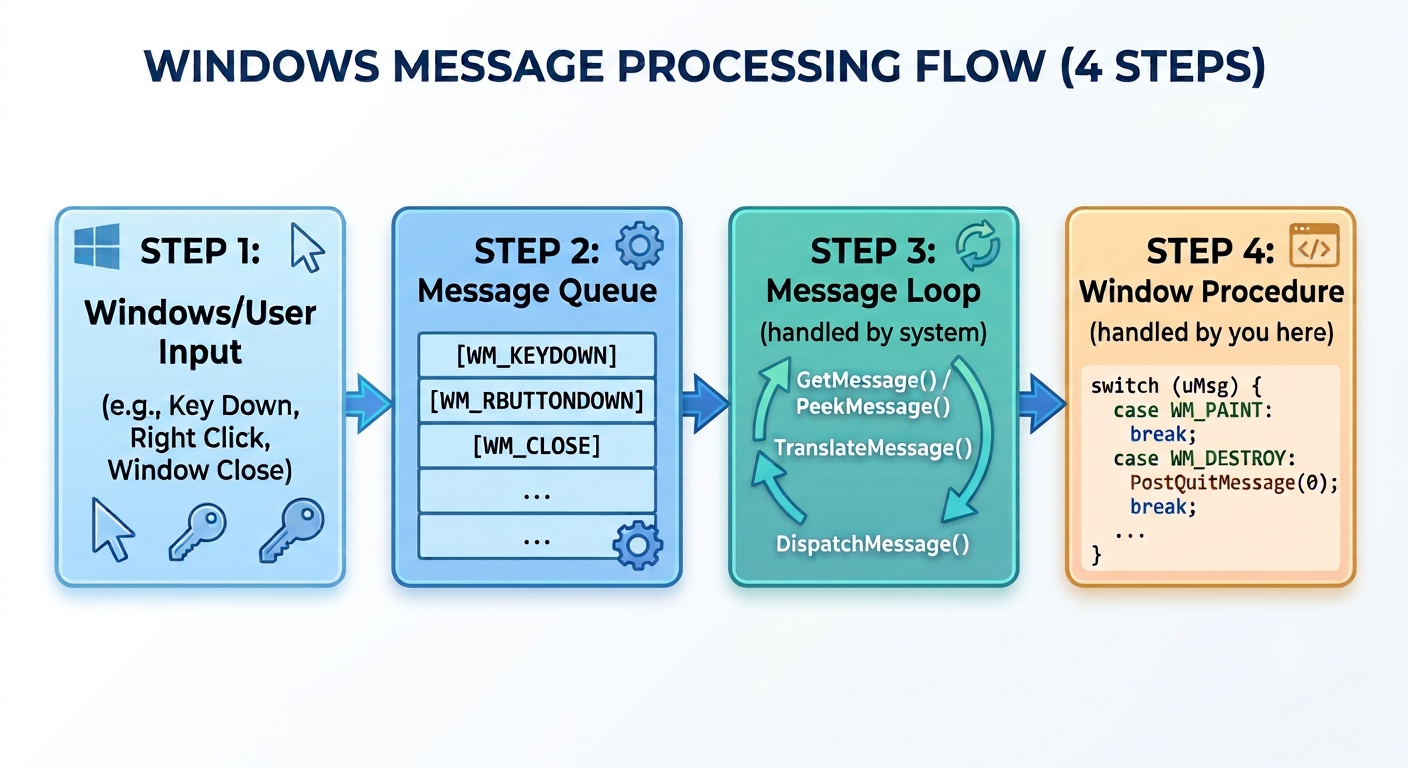
Every Windows application contains a block of code called the message loop. It retrieves messages from the program’s message queue and dispatches them to the right window.
The message processing flow is:
- Windows or User Input (Clicks, key presses, releases, window resizes, repaint messages, etc.)
- Message Queue
- Message Loop
- Window Procedure (case is handled here)
Moving Towards The Code
Syntax:
LRESULT CALLBACK WndProc(
    HWND hwnd,
    UINT uMsg,
    WPARAM wParam,
    LPARAM lParam
);| Parameter | Type | Meaning |
|---|---|---|
hwnd | HWND | Handle of the window that received the message. Tells you which window it is when one WndProc serves several windows. |
uMsg | UINT | The message ID, such as WM_PAINT, WM_SIZE, WM_CLOSE or WM_LBUTTONDOWN. You switch on this. |
wParam | WPARAM | First message parameter, data given by Windows. |
lParam | LPARAM | Second message parameter, data given by Windows. |
Other values:
LRESULT | Return type. |
CALLBACK | Windows callback calling convention. |
Easy sample code for window procedure:
#define WIN32_LEAN_AND_MEAN
#include <windows.h>
#include <windowsx.h>
#include <tchar.h>

TCHAR szEvent[100] = _TEXT("Press a key or click inside the window.");

// Declaring the Window Procedure Function
LRESULT CALLBACK fnWinProc(HWND hwnd, UINT uMsg, WPARAM wParam, LPARAM lParam);

int WINAPI WinMain(HINSTANCE hInstance, HINSTANCE hPrevInstance, LPSTR szCmdLine, int iCmdShow)
{
    TCHAR szAppName[] = _TEXT("Window Proc Example");
    WNDCLASS wndClass;
    HWND hwnd;
    MSG uMsg;

    // Creating Window Class
    wndClass.cbClsExtra = 0;
    wndClass.cbWndExtra = 0;
    wndClass.hbrBackground = (HBRUSH)GetStockObject(WHITE_BRUSH);
    wndClass.hCursor = LoadCursor(NULL, IDC_ARROW);
    wndClass.hIcon = LoadIcon(NULL, IDI_APPLICATION);
    wndClass.hInstance = hInstance;
    // Assigned Window Procedure
    wndClass.lpfnWndProc = fnWinProc;
    wndClass.lpszClassName = szAppName;
    wndClass.lpszMenuName = NULL;
    wndClass.style = CS_HREDRAW | CS_VREDRAW;

    if (!RegisterClass(&wndClass))
    {
        static TCHAR szBuff[256];
        wsprintf(szBuff, _TEXT("Cannot Register Window Class named \" %s \""), wndClass.lpszClassName);
        MessageBox(NULL, szBuff, _TEXT("ERROR"), MB_ICONERROR | MB_APPLMODAL);
        return 1;
    }

    hwnd = CreateWindow(szAppName,
                        szAppName,
                        WS_OVERLAPPEDWINDOW,
                        CW_USEDEFAULT,
                        CW_USEDEFAULT,
                        CW_USEDEFAULT,
                        CW_USEDEFAULT,
                        NULL,
                        NULL,
                        hInstance,
                        NULL);

    if (!hwnd)
    {
        MessageBox(NULL, _TEXT("Window creation failed!"),
                   _TEXT("ERROR"), MB_ICONERROR);
        return 1;
    }

    ShowWindow(hwnd, iCmdShow);
    UpdateWindow(hwnd);

    // MESSAGE LOOP
    while (GetMessage(&uMsg, NULL, 0, 0))
    {
        TranslateMessage(&uMsg);
        DispatchMessage(&uMsg);
    }

    return (int)uMsg.wParam;
}

// Defining Window Procedure
LRESULT CALLBACK fnWinProc(HWND hwnd, UINT uMsg, WPARAM wParam, LPARAM lParam)
{
    // Creating switch on uMsg
    switch (uMsg)
    {
    // Handling cases
    case WM_KEYDOWN:
        wsprintf(
            szEvent,
            _TEXT("Virtual Key: %d"),
            (int)wParam);
        InvalidateRect(hwnd, NULL, TRUE);
        return 0;

    case WM_CHAR:
        wsprintf(
            szEvent,
            _TEXT("Character: %c | Code: %d"),
            (TCHAR)wParam,
            (int)wParam);
        InvalidateRect(hwnd, NULL, TRUE);
        return 0;

    case WM_LBUTTONDOWN:
        wsprintf(
            szEvent,
            _TEXT("Mouse clicked at X: %d, Y: %d"),
            GET_X_LPARAM(lParam), // Reading extra data given by windows
            GET_Y_LPARAM(lParam));
        InvalidateRect(hwnd, NULL, TRUE);
        return 0;

    case WM_PAINT:
    {
        PAINTSTRUCT ps;
        HDC hdc = BeginPaint(hwnd, &ps);
        TextOut(hdc, 20, 20, szEvent, lstrlen(szEvent));
        EndPaint(hwnd, &ps);
        return 0;
    }

    case WM_DESTROY:
        PostQuitMessage(0);
        return 0;
    }

    // Redirecting to Default Window Procedure to manage unhandled cases
    return DefWindowProc(hwnd, uMsg, wParam, lParam);
}
You can compile it with the following:
g++ .\WndProcExample.cpp -o WndProcExample.exe -lgdi32 -luser32 -mwindowsMessages You Will Use Most
| Message | When it arrives |
|---|---|
WM_CREATE | The window is being created |
WM_PAINT | The window needs redrawing |
WM_SIZE | The window was resized |
WM_CLOSE | The user clicked the close button |
WM_DESTROY | The window is being destroyed, so call PostQuitMessage(0) |
Why DefWindowProc Matters
DefWindowProc performs the standard behavior for every message you do not handle (moving, resizing, closing and so on). If you skip it, the window will behave oddly or not work at all.
Common Mistakes
- Forgetting
DefWindowProcfor unhandled messages. - Forgetting
PostQuitMessage(0)inWM_DESTROY, so the process keeps running after the window closes. - Drawing outside
WM_PAINT.